Keep your project
on budget.
On schedule.
Storypole is a free renovation budget & schedule tracker. Track every cost, payment, phase and decision of your renovation, extension or new build, and see the real finish date before the surprises find you.
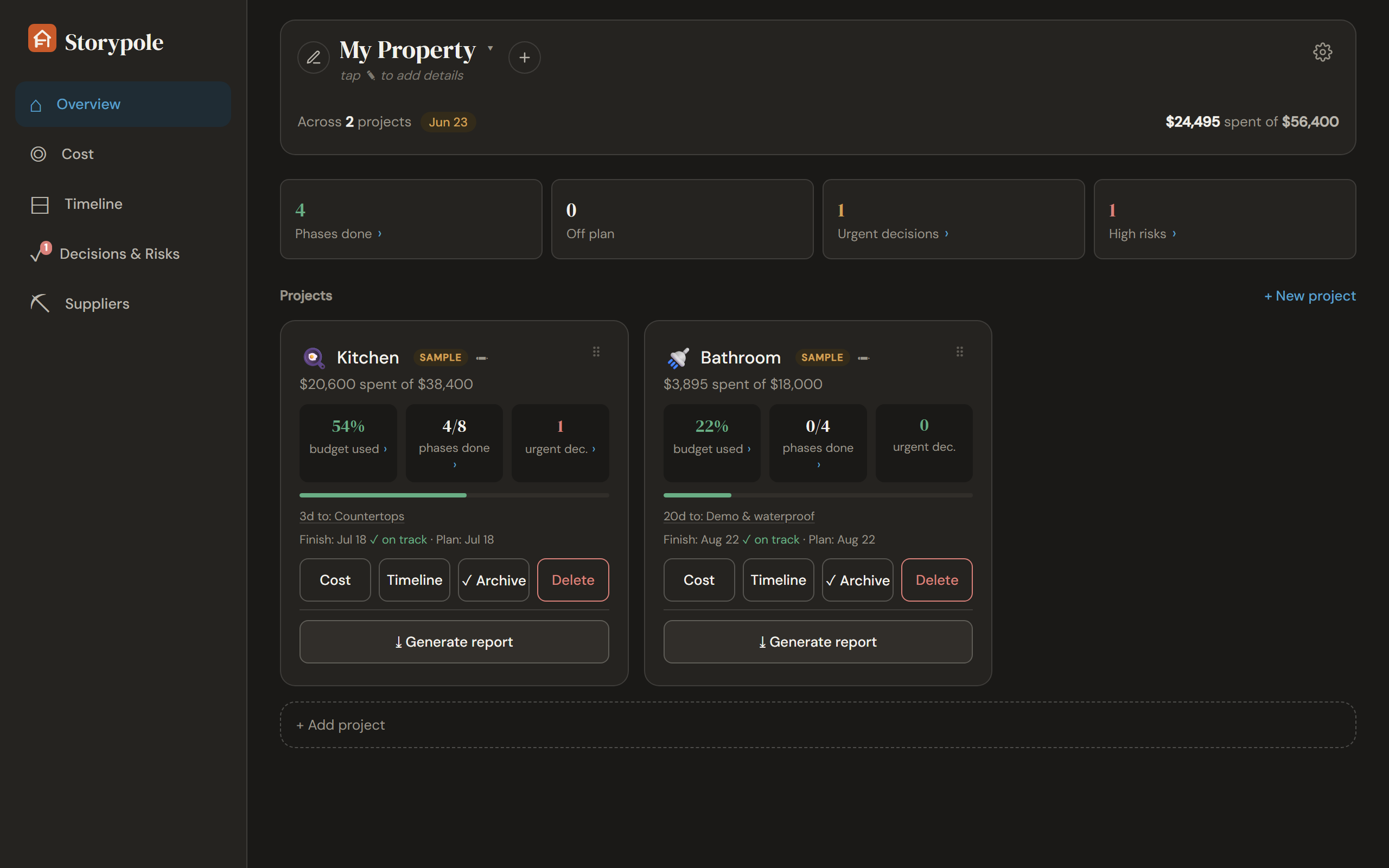
See where your project really stands
Budgets drift, phases slip, decisions block work. Storypole is built around how real projects behave, so instead of a folder of guesses you get one honest picture of the money, the timeline, and what’s about to go wrong.
A budget that matches reality
Categories, commitments, payment plans and a contingency buffer, with spent vs committed vs yet-to-buy instead of one misleading total. And per contractor: what you’ve paid, what’s still owed, and which phases they’re on.
A schedule with a critical path
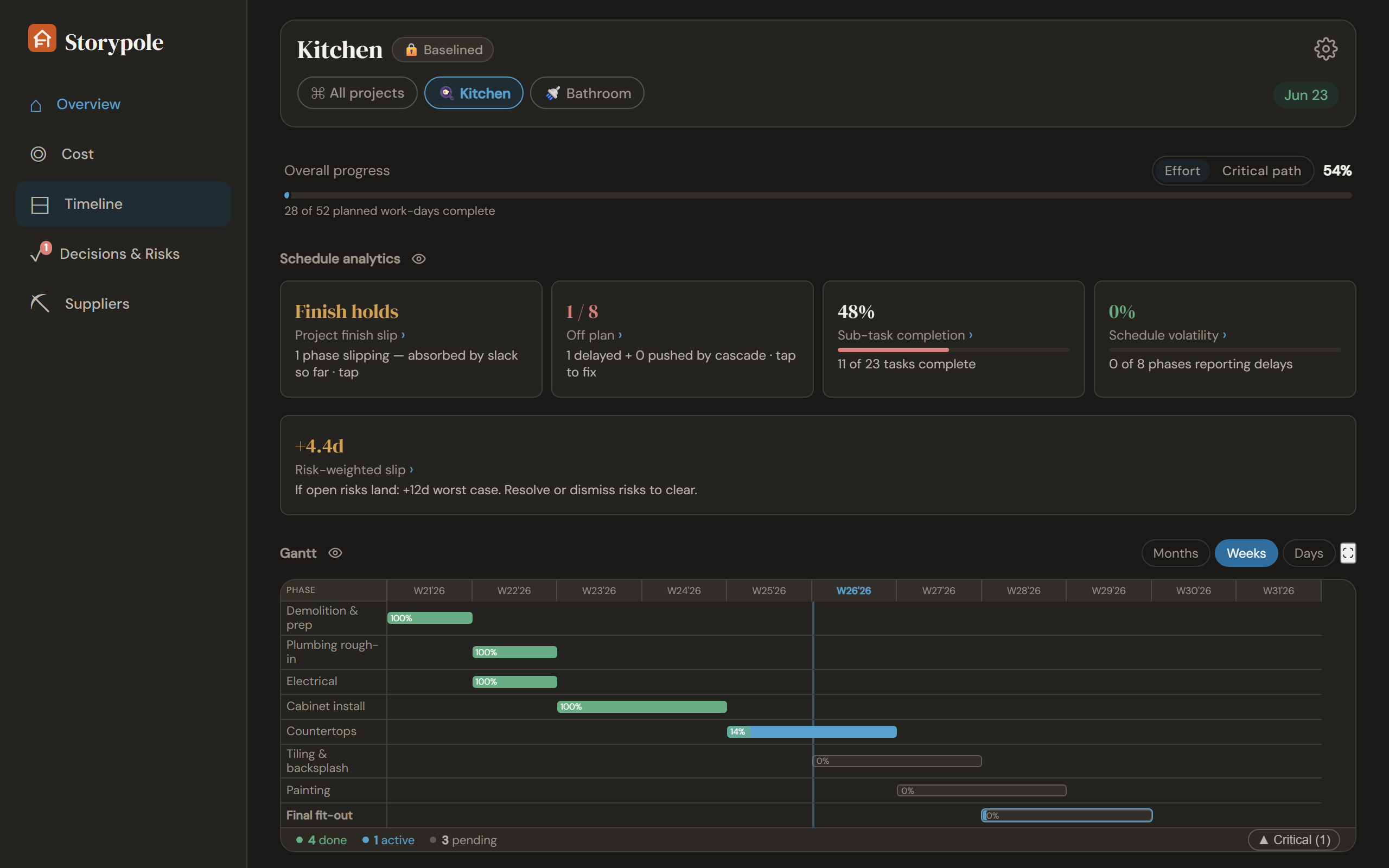
Phases with dependencies, baseline locking and a Gantt chart. When something slips, see exactly what it drags with it, and your true finish date.
Cash-flow forecast
An S-curve projection and estimate-at-completion built from your actual spending pace, so the end cost stops being a guess.
Decisions & risks
A decision log with deadlines tied to the phases they block, and a risk register that prices each risk in money and days.
Photos & receipts
Shoot site progress and receipts straight from your phone. They attach to the right phase or purchase and follow your data everywhere.
Reports you can hand over
A printable PDF status report and a full Excel workbook with charts, for your partner, your bank, or your own peace of mind. See for yourself: sample PDF · sample Excel.
Every project in one view Premium
Running more than one? Put all your properties on a single portfolio dashboard, with budgets, cash flow and slippage side by side, so you spot the flip that’s bleeding before it eats the margin. Built for flippers and small GCs juggling jobs at once.
Your data never touches our servers
Storypole has no backend. Your budget, contracts and photos live in your browser, and backups are ordinary files you own. There is no account to create and nothing for anyone to leak.
Want sync across devices? It goes through your own Google Drive. The app talks directly to Google from your browser. We never see, store, or monetize a single number.
Built for the building site
Basements, half-built extensions and remote plots have terrible internet. Storypole loads instantly and runs fully offline, so you add the emergency cost change while you’re standing in the dust, not later from memory.
Back in Wi-Fi range, your changes sync automatically. Your phone is the capture device; your desktop is the control room.
Up and running in three minutes
Open it
No install, no sign-up. The app opens in your browser with a sample project so you can poke around first.
Set up your project
A guided setup walks you through budget, categories and phases, with smart templates for kitchens, bathrooms, full remodels and more, or start from a blank slate for any kind of project.
Take it on site
Add it to your phone’s home screen. Capture costs, photos and receipts as they happen. Offline is fine.
Simple, honest pricing
The core app is free, a full tier, not a trial. Premium adds the conveniences.
Free
- Full budget, schedule, decisions & risks
- Gantt, critical path, cash-flow forecast
- Photos & receipts
- JSON backup + linked auto-save file
- 1 property
- Cloud sync across devices
- Excel export & PDF report
Premium coming soon
- Everything in Free
- Sync across devices via your own Google Drive
- Unlimited properties, a portfolio dashboard across every flip and project
- Excel export & import
- Printable PDF report
- One key, up to 5 devices
Curious what you get? Sample PDF report · sample Excel report.
Open the appQuestions, answered
Is it really free?
Yes. Everything you need to run one project, renovation or new build (budget, schedule, decisions, risks, forecast, photos) is free, with no time limit. Premium will be a single $29 payment for cross-device sync, multiple properties, Excel and PDF. Until August 1, 2026, while Storypole is in open beta, every Premium feature is free for everyone too.
Where is my data stored?
On your device, in your browser’s storage, plus a backup file you can place anywhere (your Drive or OneDrive folder, a USB stick). Optional cloud sync keeps a tidy “Storypole” folder in your own Google Drive (your project file plus your photos). There is no Storypole server, so we couldn’t read your data even if we wanted to.
Can I lose my data?
Yes, if you keep it only in the browser. Because everything lives in your browser’s storage, clearing site data (“Clear browsing data”, “Forget about this site”, disk-cleanup tools) deletes your project too. There is no server copy to rescue you, by design. The fix takes one minute: in Settings, link a backup file once and Storypole silently rewrites it after every change. That is a real file on your disk that survives any browser wipe (drop it in a Drive/OneDrive folder and it’s off-device too). Cloud sync to your own Google Drive or a manual JSON backup work as well. Set one of these up before you enter real numbers.
What’s in each backup?
Every backup covers all your properties, including archived ones. They differ in one thing: whether they carry your photo and receipt images.
| Backup | Photos | Best for |
|---|---|---|
| JSON (.json) | Data only | Exact, lossless restore. The everyday safety net. Free. |
| Full backup (.zip) | Included | A complete copy, photos and all, to store anywhere. Free. |
| Excel (.xlsx) | No | Edit your costs & schedule in a spreadsheet and merge changes back, plus a full read-only data dump. Not a backup, use JSON/.zip to restore. Premium. |
Rather not think about it? Optional Google Drive sync does all of this automatically across your devices, photos included.
Does it work offline?
Fully. The app caches itself on first load and every feature works with no connection. The only things that touch the internet are the optional Google Drive sync, Excel import/export (which loads its converter on demand), and, if you buy Premium, a roughly weekly license check that silently skips when you're offline (being offline never turns Premium off).
Can I use it like a normal app, with its own icon?
Yes, and there’s still nothing to download. Storypole is a modern web app, so your browser can “install” it: that just means it gets its own icon and opens in its own window, like any app on your phone or computer. First open the app itself. Installing works from inside the app, not from this page. Then on your phone, open the menu in Chrome or Safari and tap Add to Home Screen; on a Windows or Mac computer, look for the small install icon at the right end of Chrome’s or Edge’s address bar (or menu → “Install Storypole”). Same app, same data, just one tap from your home screen or Start menu, and it works offline either way. Using it in a plain browser tab is fine too.
Does it track my project automatically?
No tool can. Storypole automates everything that can be automated (rollups, the critical path, slip cascades, forecasts, reports), but it computes them from what you log. Enter payments when you make them, mark phases done, record decisions and risks as they come up, and the picture it shows is the real status of your project. Skip the logging and it will be exactly as useful as the data you gave it. A few minutes after each site visit is the honest price of knowing where your money and schedule actually stand.
What if Storypole shuts down someday?
You lose nothing. The app is a self-contained file that keeps working on your device, your data is already local, and you can export everything to Excel or JSON at any time. We think software you rely on should fail gracefully, and most cloud tools can’t make that promise.